
Managing customer relationships is no longer optional for small and midsize businesses. As soon as you create an online presence—through a website, social media, or email marketing—you begin collecting valuable customer data. Without the right tools, this data quickly becomes scattered, disorganised, and difficult to use.
This is where CRM (Customer Relationship Management) software becomes essential. While small businesses may not need the advanced capabilities of large enterprises, they do need core CRM features that help organise data, personalise marketing, improve sales performance, and support growth.
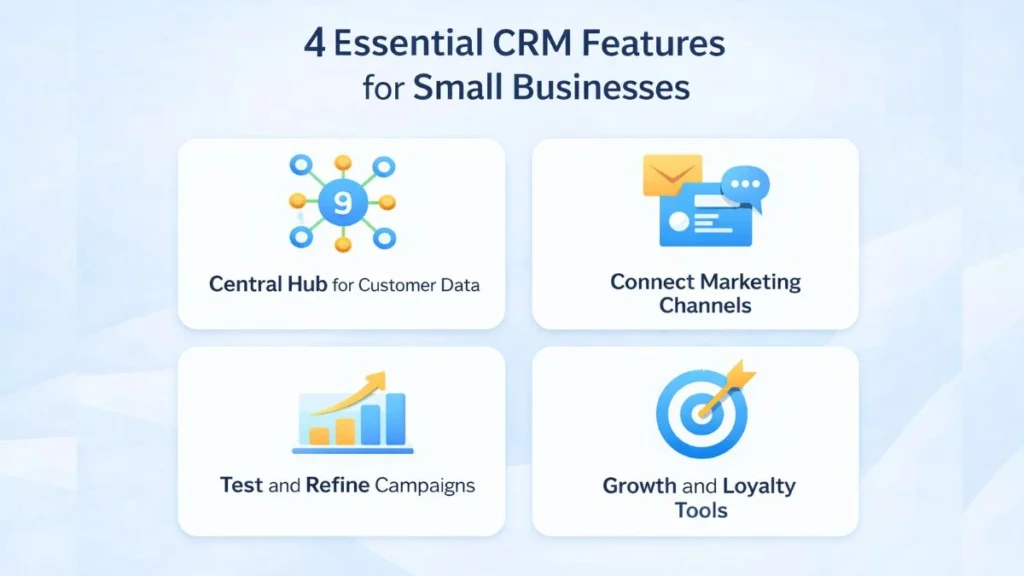
In this article, we explore the 4 essential CRM features for small and midsize businesses, why they matter, and how they help businesses grow efficiently.
Why Small and Midsize Businesses Need CRM
Many small business owners believe CRM is only for large companies. In reality, CRM is most valuable early in your growth journey. A good CRM system helps you:
- Build a strong customer data foundation
- Understand your audience better
- Automate repetitive tasks
- Make smarter marketing and sales decisions
With limited budgets and resources, small businesses must work smarter—and CRM helps do exactly that.
1. A Central Hub for Audience Data
Why It Matters
The most important CRM feature for any small business is a centralised hub for customer data. This creates a single source of truth for all customer information.
What It Includes
- Contact information
- Sales activity
- Phone calls and emails
- Customer preferences
- Customer satisfaction and feedback
Instead of storing data in spreadsheets, inboxes, and separate tools, CRM brings everything together in one place.
Benefits for Small Businesses
- Better organisation of customer information
- Clear visibility into customer behaviour
- Easier identification of patterns and trends
- Improved customer experience
When you understand where your customers come from and what they respond to, you can communicate more effectively.
2. Seamless Connection to Key Marketing Channels
Why It Matters
For small businesses with limited sales teams, marketing plays a major role in selling. CRM software should integrate seamlessly with your key marketing channels.
Key Marketing Channels to Connect
- Email marketing platforms
- Social media platforms
- Website forms and landing pages
- Mobile communication tools
Without integration, valuable data remains siloed, making it difficult to personalise communication.
Benefits for Small Businesses
- Unified customer profiles
- Better campaign targeting
- Reduced data loss
- Consistent messaging across channels
CRM ensures that customer insights flow directly into your marketing efforts.
3. Ability to Test, Learn, and Improve Campaigns
Why It Matters
Growing businesses are constantly learning about their audience. CRM software should make it easy to test campaigns, analyse performance, and improve over time.
What CRM Helps You Do
- Track email opens and clicks
- Measure campaign performance
- Analyse customer engagement
- Identify what works and what doesn’t
This allows businesses to adjust their messaging and strategies based on real data.
Benefits for Small Businesses
- Better marketing performance
- Improved sales management
- Smarter decision-making
- Continuous improvement
CRM transforms marketing from guesswork into a data-driven process.
4. Tools That Support Growth and Customer Loyalty
Why It Matters
As your business grows, your CRM should grow with you. The right CRM provides tools that help you find new customers and build long-term loyalty.
Key Growth Tools
- Lead management and scoring
- Sales forecasting
- Customer segmentation
- Automation workflows
These tools help you focus your limited budget on customers most likely to buy.
Benefits for Small Businesses
- More efficient use of marketing budget
- Improved customer retention
- Stronger sales strategy
- Better long-term growth planning
CRM helps you anticipate customer needs and engage them at the right time.
How CRM Helps Small Businesses Compete
CRM software allows small businesses to:
- Personalise communication like large companies
- Respond quickly to customer needs
- Build stronger relationships
- Gain a competitive advantage
With CRM, small teams can achieve big results.
CRM and Sales Forecasting
CRM tools support sales forecasting by:
- Tracking past sales activity
- Analysing customer behaviour
- Predicting future revenue
This helps small businesses plan budgets and allocate resources effectively.
CRM Is Not a Full-Time Job
Modern CRM tools are designed to be easy to use and low maintenance. Even solo entrepreneurs can benefit from CRM without spending hours managing it.
Automation features save time and allow business owners to focus on growth.
Conclusion
CRM software is no longer a luxury—it is a necessity for small and midsize businesses. By focusing on these four essential CRM features, businesses can build a strong foundation for managing customer relationships, improving marketing performance, and supporting long-term growth.
With the right CRM, small businesses can work smarter, engage customers more effectively, and compete confidently in today’s digital marketplace.
❓ Frequently Asked Questions (FAQs)
1. What are the essential CRM features for small businesses?
A central data hub, marketing channel integration, campaign analytics, and growth tools.
2. Do small businesses really need CRM software?
Yes. CRM helps small businesses organise data, improve marketing, and grow efficiently.
3. Is CRM expensive for small businesses?
Many CRM tools are affordable and offer free or low-cost plans.
4. How does CRM improve marketing?
CRM enables personalised campaigns, better targeting, and improved ROI.
5. Can CRM help with customer loyalty?
Yes. CRM helps track preferences and deliver consistent, personalised experiences.
6. Does CRM require technical skills?
No. Most modern CRM tools are user-friendly and easy to learn.
7. Can CRM support sales forecasting?
Yes. CRM tracks sales data and helps predict future performance.
8. What marketing channels can CRM integrate with?
Email, social media, websites, and mobile platforms.
9. Is CRM useful for solo entrepreneurs?
Absolutely. CRM helps save time and manage customer relationships effectively.
10. When should a small business start using CRM?
As early as possible—ideally when you begin collecting customer data.