
Choosing the right CRM (Customer Relationship Management) system is one of the most important technology decisions a business can make. A CRM directly affects how you manage leads, serve customers, close sales, and scale operations. The wrong choice can lead to low adoption, wasted money, and frustrated teams, while the right CRM can become the backbone of your growth strategy.
With so many CRM systems available, the decision can feel overwhelming. This guide explains how to choose the right CRM system for your business needs, step by step, so you can make a confident and informed choice.
Understand What a CRM System Does
A CRM system is designed to:
- Store and organize customer data
- Track leads and sales opportunities
- Manage communication and follow-ups
- Support marketing and customer service
- Provide reports and business insights
Modern CRM systems go beyond contact management and act as all-in-one business platforms.
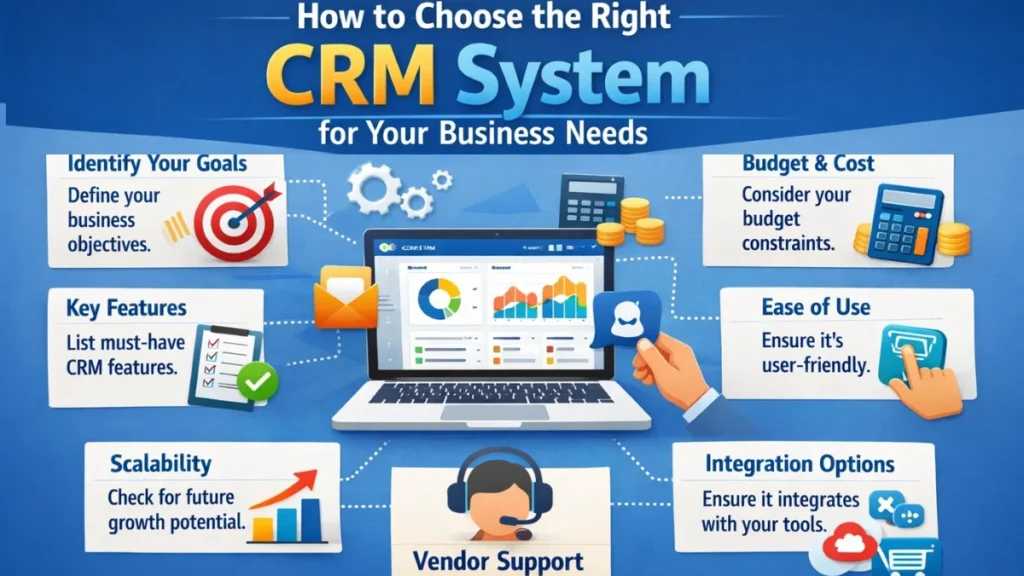
Identify Your Business Goals First
Before comparing CRM features, clearly define what you want to achieve.
Ask yourself:
- Do you want to increase sales conversions?
- Do you want better customer support?
- Do you want to automate marketing follow-ups?
- Do you want better reporting and forecasting?
Your goals will determine which CRM features matter most.
Analyze Your Business Size and Structure
Small Businesses and Startups
Small teams usually need:
- Simple interface
- Basic lead and contact management
- Easy automation
- Affordable pricing
Overly complex CRM systems can slow adoption.
Medium and Growing Businesses
Growing businesses need:
- Sales pipeline management
- Marketing automation
- Team collaboration tools
- Scalable data handling
Large Enterprises
Enterprises require:
- Advanced analytics
- Custom workflows
- High-level security
- Multiple team access controls
Define Must-Have CRM Features
Every business should list essential vs optional features.
Common must-have features include:
- Contact and lead management
- Sales pipeline tracking
- Task and reminder automation
- Email integration
- Reporting dashboards
Optional features may include:
- AI-powered insights
- Advanced marketing automation
- Custom integrations
- Customer support tools
Ease of Use and Team Adoption
A powerful CRM is useless if your team does not use it.
Look for:
- Clean, intuitive interface
- Minimal training requirements
- Easy navigation
- Mobile accessibility
User-friendly CRM systems lead to higher adoption and better ROI.
Customization and Flexibility
Your business is unique, and your CRM should adapt to it.
Key customization options include:
- Custom fields
- Workflow automation
- Sales stages
- User roles and permissions
Avoid rigid systems that force you to change how you work.
Integration with Existing Tools
Your CRM should integrate seamlessly with:
- Email platforms
- Marketing tools
- Accounting software
- Customer support systems
Good integration reduces manual work and keeps data consistent across platforms.
Automation Capabilities
Automation saves time and improves consistency.
Look for CRM systems that automate:
- Lead assignments
- Follow-up reminders
- Email sequences
- Status updates
Automation allows teams to focus on strategy instead of repetitive tasks.
Reporting and Analytics
Data-driven decisions require clear insights.
A good CRM should offer:
- Real-time dashboards
- Sales and marketing reports
- Performance tracking
- Forecasting tools
Advanced analytics help you identify growth opportunities early.
Data Security and Compliance
Customer data is sensitive and valuable.
Ensure the CRM provides:
- Data encryption
- Access control
- Regular backups
- Compliance support
Strong security builds trust and protects your business.
Scalability for Future Growth
Choose a CRM that grows with your business.
Scalable CRM systems:
- Support more users
- Handle larger data volumes
- Add features without disruption
Switching CRM systems later can be costly and time-consuming.
Pricing and Total Cost of Ownership
CRM pricing is not just about monthly fees.
Consider:
- Setup costs
- Training costs
- Add-on features
- User limits
Choose a CRM that offers clear value, not just low price.
Vendor Support and Reliability
Reliable support matters, especially during setup.
Evaluate:
- Customer support availability
- Documentation and training resources
- System uptime and updates
A strong vendor partnership ensures long-term success.
Test Before You Commit
Most CRM systems offer free trials or demos.
During testing:
- Involve your team
- Test real workflows
- Evaluate performance
- Check usability
Hands-on experience helps confirm the right choice.
Common Mistakes to Avoid When Choosing a CRM
- Choosing based on popularity alone
- Ignoring team feedback
- Overpaying for unused features
- Underestimating future growth
- Skipping training and onboarding
Avoiding these mistakes increases CRM success.
Final Checklist Before Choosing a CRM
Before making a decision, confirm:
- It matches your business goals
- It fits your team’s workflow
- It integrates with your tools
- It is secure and scalable
- It offers strong support
Conclusion
Choosing the right CRM system is not about finding the most famous or feature-packed tool. It’s about selecting a solution that aligns with your business needs, supports your team, and scales with growth.
A well-chosen CRM improves efficiency, strengthens customer relationships, and drives long-term success. With the right evaluation process, your CRM can become one of the most valuable assets in your business.
FAQs
How do I know if my business needs a CRM?
If you manage leads, customers, or sales across multiple channels, a CRM is essential.
Is CRM only for sales teams?
No, CRM systems support marketing, customer support, and management teams.
How long does CRM implementation take?
Implementation can take from a few days to several weeks, depending on complexity.
Can I change CRM systems later?
Yes, but switching can be costly, so choosing wisely at the start is important.
Does CRM guarantee business growth?
CRM supports growth by improving organization and decision-making, but success depends on proper usage.